Summary
- ASUS ROG has released the Strix XG129C, a 12.3-inch secondary touchscreen monitor built around a 24:9 IPS panel with 10-point multi-touch, 90% DCI-P3 color coverage, and a 75Hz refresh rate
- The monitor ships with a one-year AIDA64 Extreme subscription and exclusive ROG SensorPanel themes, enabling real-time hardware monitoring for CPU temperature, GPU load, fan speed, and memory usage directly on the secondary screen
- A hybrid USB-C port handles power, video, and touch data through a single cable, while a built-in adjustable kickstand and 1/4-inch tripod socket offer flexible placement beneath or alongside a primary monitor
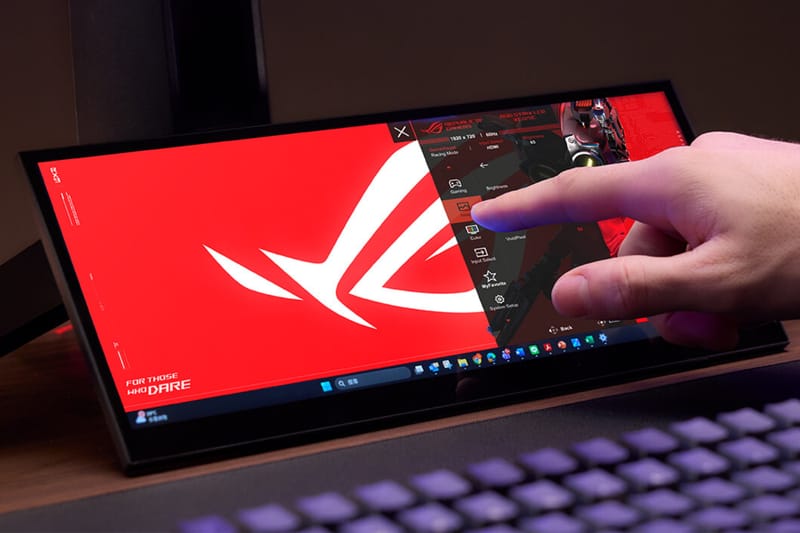
ASUS ROG has launched the Strix XG129C, a 12.3-inch touchscreen monitor meant to be a helpful addition to your gaming setup. It’s designed to give you a dedicated screen for things like keeping an eye on your system’s performance, managing chats, and handling multiple tasks at once. The XG129C uses a 1920×720 widescreen (24:9) IPS panel and is intended as a secondary monitor, not a replacement for your main display.
What really sets the XG129C apart from other portable monitors is its shape. Its 24:9 aspect ratio gives you significantly more vertical screen space than similar-sized monitors with a 32:9 ratio. This is especially useful when you’re using it for things like chat windows, system monitoring, or browsing the web alongside your main computer screen. While it also reduces black bars when watching standard 16:9 videos, the extra vertical space is the main reason for this design. Plus, the screen displays colors well – covering 125% of the sRGB and 90% of the DCI-P3 color spaces – so you won’t get a jarring difference in color when using it as a second monitor.
Beyond its visual capabilities, the XG129C excels with its touch functionality. It recognizes up to 10 simultaneous touches, letting you easily interact with what’s on the screen. You can control on-screen elements, run automated tasks, change display settings, and even use Windows without a mouse or keyboard. The touch response is smooth and natural, making it a practical tool for creative professionals. For example, those using programs like Adobe Premiere or Spotify can use the screen as a control surface, adjusting settings with customizable virtual dials and sliders through the included ASUS Control Panel software.
The XG129C truly shines when paired with the AIDA64 Extreme bundle, appealing to users who demand the most from their hardware. The included one-year subscription provides live monitoring of key performance metrics – CPU temperature, GPU usage, clock speeds, voltages, and fan speeds – displayed through custom ROG SensorPanel themes tailored for the screen’s size. For gamers and content creators who are maximizing their system’s power, having this information on a separate display is a significant improvement over on-screen displays or constantly switching between applications.
This monitor connects to devices using two USB-C ports and one HDMI 1.2 port. One USB-C port does it all – it carries video, power, and touch data at the same time, simplifying cables for laptops that support DisplayPort Alt Mode. The other USB-C port provides 20W of power. The monitor itself is designed to be sleek with very narrow borders, and includes an adjustable stand that fits neatly under a computer monitor. It also has a standard tripod mount for other mounting options.
Today’s desk setups often include multiple monitors, especially for streamers, gamers, and content creators who rely on second screens as essential tools, not just extras. The XG129C monitor is specifically designed to meet this need, with every feature focused on maximizing its usefulness as a secondary display. The fact that it’s already won a Red Dot 2026 Gaming and Streaming Design award confirms that this approach is well-received.
The ROG Strix XG129C is available now through ASUS ROG and select retailers.
Read More
- Total Football free codes and how to redeem them (March 2026)
- Clash of Clans May 2026: List of Weekly Events, Challenges, and Rewards
- Farming Simulator 26 arrives May 19, 2026 with immersive farming and new challenges on mobile and Switch
- Honor of Kings x Attack on Titan Collab Skins: All Skins, Price, and Availability
- NTE: Neverness to Everness Original Game Soundtracks: Your Ultimate Playlist Guide
- Last Furry: Survival redeem codes and how to use them (April 2026)
- Gold Rate Forecast
- COD Mobile Season 4 2026 – Eternal Prison brings Rebirth Island, Mythic DP27, and Godzilla x Kong collaboration
- Zenless Zone Zero version 2.8 ‘New: Eridan Sunset’ update will release on May 6, 2026
- Top 5 Best New Mobile Games to play in May 2026
2026-05-12 11:28