
Morikomori Life is a relaxing 3D simulation game where you build and grow a rural town. Created by Realfun Studio, it’s now available on iOS and Android. This guide will give you helpful tips to get started and make the most of your gameplay experience.
Just starting out with cozy life simulation games like Morikomori Life? This guide will give you a helpful introduction to the basics. And don’t forget to check out our article on redeem codes for some free in-game items!
Morikomori Life Gameplay Basics
Gameplay Overview
Let’s take a look at how Morikomori Life is played. This 3D simulation game has a charming story and lets you explore a village, create your own character, and enjoy lots of other fun features. The game starts with a relaxing cutscene reminiscent of Studio Ghibli films, where you play as a character riding a train through a city.
As you travel, memories of a simpler, happier childhood fill your mind, and you find yourself longing for your old village. Overwhelmed by the noise and fast pace of city life, you decide to return to Komori, your grandmother’s village – a beautiful, quiet place in the countryside known for its cherry blossoms and welcoming neighbors.
Character Selection and Story Progression
Once the introductory movie finishes, you get to pick whether you want to play as a male or female character. You can also personalize your character with options like cute outfits, vibrant hairstyles, and different facial features.
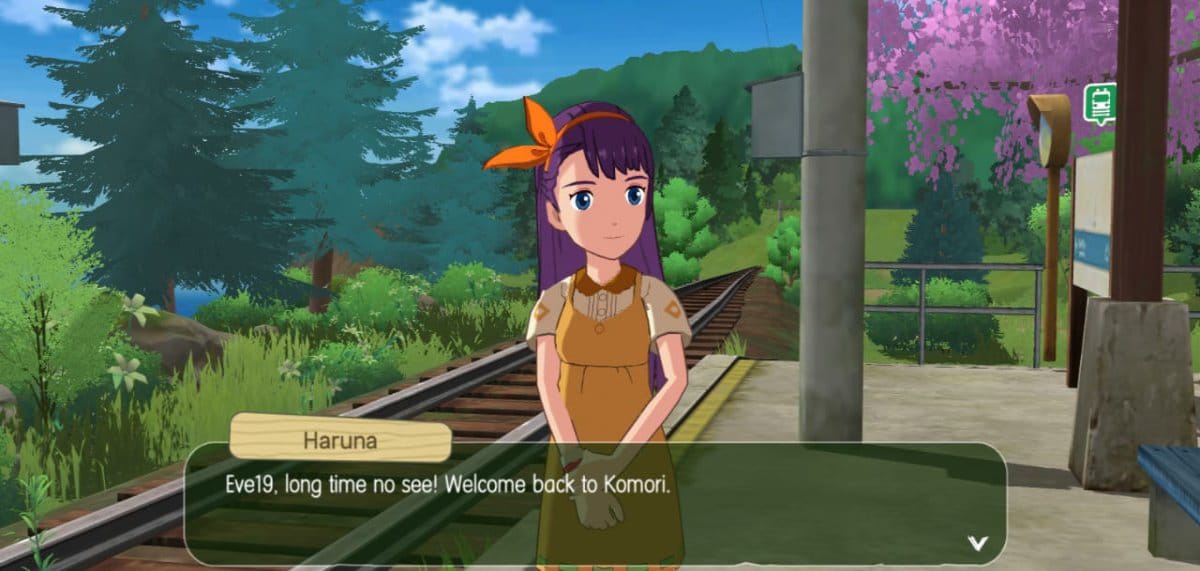
So, the game starts with me chatting with Haruna, who I’ve known since we were kids. She’s awesome and helps me meet the village chief, which is basically my first job in Komori village. It’s a really cozy start to the game!

Once you’ve spoken with the village chief, Masao, you’ll be sent to your grandmother’s house, only to find it completely destroyed. As you progress through the game and complete objectives, you’ll unlock more areas to explore on the world map. Initially, you can only visit the village, the station, and your own home. Later, you’ll gain access to the forest near the village.
Understanding Game Controls and Features
Okay, so in Morikomori Life, you can actually chat with people from all over the world! There’s a global chat right up at the top left, near where the taskbar is. Moving around is pretty easy too – there are controls down on the bottom left. And get this, you can swipe left and right on your phone screen to change how you’re looking at everything, which is super cool!

At the bottom of the screen, you’ll find your ‘bag’ – this is where all your tools like the sickle, axe, and pickaxe are kept, along with resources like softwood, brick stones, and lapis lazuli. On the right side of the screen are buttons for fast running and using tools, which you’ll use to clear weeds, chop wood, and break stones.
You’ll find your map and gold amount in the upper-right corner of the screen. The game also includes a cellphone feature. As you meet characters like Haruna, Masao (the village chief), Genzou (the carpenter), and Shimaga (the smith), you’ll get their contact numbers after completing their tasks, allowing you to chat with them.

I really like that the game has these character albums – it’s cool to collect all the NPCs and learn little bits about their lives. Plus, it keeps track of my affinity level with each character, so I can see how much they like me after we chat!
You can also find titles and achievements in the game. Your cellphone, album, character profile, and energy bar are all located at the top left of the screen. Other important features, like rewards, the prize pool, the shop, and the option to remove ads, are also accessible there.
Performing Daily Tasks and Mastering Tools in Morikomori Life
Tasks

Morikomori Life keeps the game fun and interesting by offering lots of different things to do, like chopping wood, weeding, breaking stones, fixing up your house (including doors, floors, and stairs), getting rid of old furniture, cooking, growing vegetables, decorating your home and yard, exploring the world to meet people, and gathering resources.
Notice Board

The noticeboard is where you can improve and customize your house in the game. Upgrading your house gives you more space and unlocks new rooms. You can also use it to invite friends over and visit their houses!
Carpentry Table, Smithing Table, and Assembly Table
Okay, so when I chop down trees, I can’t just use the wood right away to fix things or build stuff. I have to head over to my carpentry table and turn the softwood into softwood planks first. Then those planks are what I use for repairs and better building materials. It’s the same with stone too – I can’t just take the raw stones and make walls, statues, or even a cooking stone table. I need to process them first!

First, head to the smithery, which is close to the carpentry table, and make some stone bricks. You’ll need these to craft items from stone later on. At the assembly table, you can build furniture for your home using both wood and stone. You can also use the table to craft items from rare stones and gems.
Exploring the World Map

Morikomori Life features a huge and beautiful world to discover, with stunning visuals and lots of new things to find. You can explore diverse locations like Dawn Woods, White Dew Ridge, Slumbering Mine, Dusky Woods, Sacred Mount, and Meowland, among others.
Morikomori Life Beginners Guide: Tips and Tricks
- The energy bar depletes faster when you are doing tasks for story progression. So, keep an eye on the energy bar and use it wisely.
- While exploring the woods, don’t go too far without proper equipment and food.
- Interact and gift more with the NPCs to increase affinity levels with them.
- Complete daily tasks properly to gain more coins and resources.
Final Thoughts
Morikomori Life really reminded me of Genshin Impact, but it focuses on everyday life instead of fantasy or action. The art style and world design felt very similar. If you enjoy relaxing and easy-going life simulation games, this could be perfect for you.
Read More
- Clash Royale Best Boss Bandit Champion decks
- Vampire’s Fall 2 redeem codes and how to use them (June 2025)
- World Eternal Online promo codes and how to use them (September 2025)
- Best Arena 9 Decks in Clast Royale
- How to find the Roaming Oak Tree in Heartopia
- Mobile Legends January 2026 Leaks: Upcoming new skins, heroes, events and more
- Country star who vanished from the spotlight 25 years ago resurfaces with viral Jessie James Decker duet
- M7 Pass Event Guide: All you need to know
- Solo Leveling Season 3 release date and details: “It may continue or it may not. Personally, I really hope that it does.”
- ATHENA: Blood Twins Hero Tier List
2025-12-06 23:12