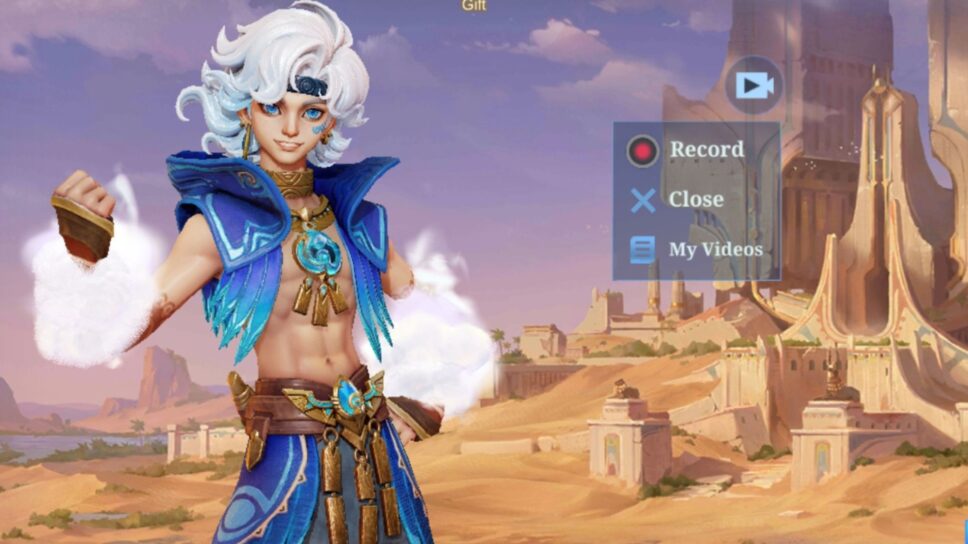
No more third-party apps! Here’s how you can use the new in-game screen recorder in MLBB.
Mobile Legends: Bang Bang is now offering a built-in screen recorder, making it easier than ever to capture and share your best moments! You won’t need to download a separate app to record gameplay anymore. However, the free recording feature does have some restrictions, so it might not be perfect for everyone.
This provides a brief overview of the new screen recorder coming to Mobile Legends: Bang Bang, including what it can do and when you might be able to use it.
How to access the free clip-sharing feature in MLBB
Recording a clip
Follow this step-by-step instruction on how to turn on the clip-sharing feature in MLBB:
- Log in to the game.
- Click on the cog icon next to the in-game mail icon at the top right corner of the screen.
- Find the Free Recording tab on the left side options.
- Toggle whether you want In-Match or Out-of-Match recording.
The In-Match recording setting makes the recorder only work when you’re actually playing a match. You won’t see it when you’re browsing menus or in the lobby. Conversely, the Out-of-Match setting lets you record even outside of matches. This allows you to capture footage of things like opening loot boxes or chatting with friends in the main menu.
Downloading or sharing the clip
Here’s how to download or share the clip on social media:
- From the main menu, tap on the cog icon.
- Access the Free Recording tab.
- Select one of the videos you have recorded.
- Choose to share it on social media or download the video.
What is the Video Free Recording feature in MLBB?
Okay, so MLBB has this new Video Free Recording feature, and it’s awesome! Basically, it lets you record gameplay clips right within the game – no need to download extra apps. Right now, it’s super easy to use, with just a few simple settings. It’s perfect for anyone who wants to save those amazing plays they pull off, or even if they suspect someone’s cheating and want to catch them in the act. It’s a really accessible way to share your highlights!
This feature has a couple of drawbacks. You can’t adjust the recording quality, and it’s fixed at 720p. Also, the recorder needs access to your microphone, but it only captures game sounds – you’ll need to record your voice separately. Please note that this information is based on the test server, and the final version might be different when it’s released.
Please be aware that as of right now, the screen recording feature in Mobile Legends: Bang Bang is only accessible on the advanced server.
MLBB Video Free Recording feature release date
Mobile Legends: Bang Bang will launch its clip-sharing feature on December 18th. This update will happen at the same time as the start of Ranked Season 38, and players can look forward to new rewards for competing.
A new hero named Sora will be released today. What makes Sora unique is his ability to change between different skill sets, making him adaptable to any lane. However, mastering all his abilities will take some practice.
Read More
- Clash Royale Best Boss Bandit Champion decks
- Mobile Legends January 2026 Leaks: Upcoming new skins, heroes, events and more
- Vampire’s Fall 2 redeem codes and how to use them (June 2025)
- Clash Royale Furnace Evolution best decks guide
- Best Hero Card Decks in Clash Royale
- Mobile Legends: Bang Bang (MLBB) Sora Guide: Best Build, Emblem and Gameplay Tips
- Best Arena 9 Decks in Clast Royale
- Clash Royale Witch Evolution best decks guide
- Brawl Stars December 2025 Brawl Talk: Two New Brawlers, Buffie, Vault, New Skins, Game Modes, and more
- Brawl Stars Steampunk Brawl Pass brings Steampunk Stu and Steampunk Gale skins, along with chromas
2025-12-10 21:11