Want to earn free League of Legends emotes? Here’s a guide on how to get them through Twitch Drops, including how to find the streams that offer them.
Seriously, there’s nothing like kicking off the new League of Legends season – 2026, here we come! – with a fresh set of Twitch emotes. It’s cool that Riot’s working with League Partners to make this happen. Basically, they’re trying to support all of us who make content – streamers, teachers, entertainers, even the people who really dive deep into the game’s strategy. It’s awesome they’re looking out for the community!
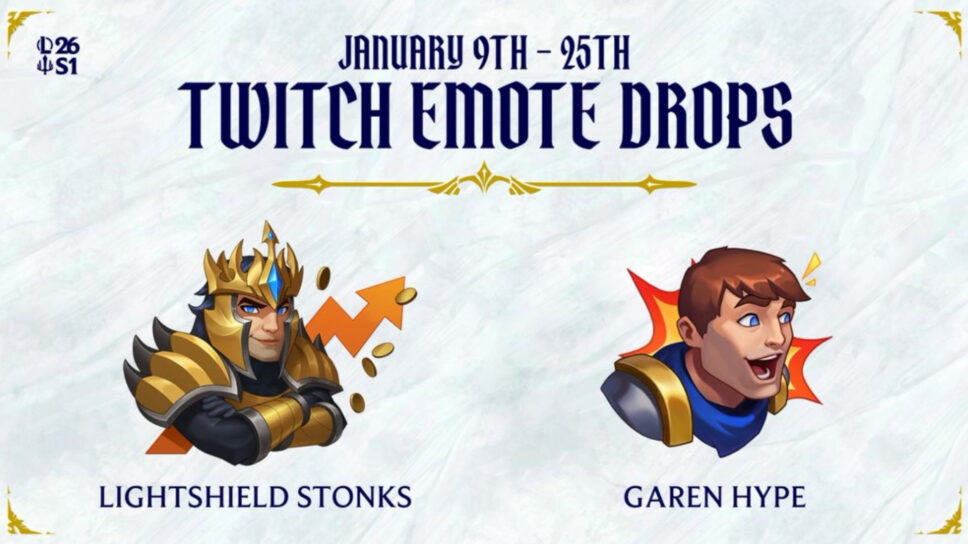
New League of Legends Twitch emote drops
Starting in 2026, you’ll be able to unlock two special emotes by supporting your favorite Twitch creators—but only if they’re part of the LPP program. To get the “Lightshield Stonks” emote, you need to watch one hour of any participating LPP streamer’s live broadcast during the promotional period. Watching recorded videos (VODs) won’t qualify you for the reward.
You can earn the “GarenHype” emote by subscribing to, or gifting a subscription to, any streamer participating in the LPP program. This only applies to your first subscription or the first time someone receives a gifted sub from you – renewing a subscription won’t get you the emote.
Which channels are eligible?
You can only earn rewards by watching streams from creators in the League Partner Program. Here’s how to check if a streamer is eligible for rewards:
- Log in to Twitch
- Choose an active Drops campaign from the All Campaigns page under Drops & Rewards.
- Find active participating channels listed at the top of How to Earn Drops.
- Navigate to a channel with Drops enabled. A Drops callout will be displayed at the top of the chat that includes information about the Drops campaign.
- Complete the Drop requirement, such as accruing watch time or purchasing (a) new subscription(s).
When you open a participating streamer’s Twitch stream, you’ll see a special graphic in their chat. This lets you know they’re offering Season Start drops.
You can subscribe on your phone or computer. To earn Drops, you must subscribe while the channel is live, streaming in the right category, and during an active Drops event. Please double-check everything before you subscribe.
You can only make progress towards a Drop by watching a single participating channel at a time – having multiple tabs open won’t speed things up. Drops aren’t limited by region, but they are only available on Twitch in areas where Twitch Drops are supported.
Redeem the League of Legends Twitch emote drops
To get your emotes, link your Riot Games and Twitch accounts. Once you’ve fully completed the progress bar for a Drop, you can claim it in your Drops inventory. If you can’t claim your Drops right away, you have seven days after the promotion ends to do so.
Here are some recommendations in case you are dealing with drop troubleshooting:
- Browser extensions that block advertisements may prevent Drops progress watch time from accruing. Disable these browser extensions, and see if your watch time continues to progress.
- If you’ve completed a drop’s requirement, but are having issues claiming the drop, double-check which game account you have connected to your Twitch account. You may need to contact the game developer or publisher directly for further assistance.
When does the drop campaign end?
From January 9th to January 25th, you can earn special rewards by watching League of Legends streams on Twitch! Enjoy the streams and collect your goodies.
Read More
- Clash Royale Best Boss Bandit Champion decks
- Vampire’s Fall 2 redeem codes and how to use them (June 2025)
- Mobile Legends January 2026 Leaks: Upcoming new skins, heroes, events and more
- M7 Pass Event Guide: All you need to know
- Clash Royale Furnace Evolution best decks guide
- Clash Royale Season 79 “Fire and Ice” January 2026 Update and Balance Changes
- World Eternal Online promo codes and how to use them (September 2025)
- Best Arena 9 Decks in Clast Royale
- Clash of Clans January 2026: List of Weekly Events, Challenges, and Rewards
- Best Hero Card Decks in Clash Royale
2026-01-10 02:41