
Story Highlights
- There’s more to Heartopia than just its fun hobbies. And exploring its little map with a vehicle is another highlight.
- So read our complete vehicle guides and learn how vehicles in Heartopia work, and exactly how to unlock each one.
Walking around Heartopia seems lovely initially, but it can quickly become tiring. Going between places like the forest, the hot springs, and events around town often takes a long time. Luckily, Heartopia now offers vehicles to help you get around more easily.
This Heartopia Vehicle Guide will show you how to unlock, use, and manage vehicles in the game. We’ve included a complete list of every vehicle and how to obtain it. For more help getting started, check out our Heartopia Beginner’s Guide, co-op guide, Hobbies Guide, tips on unlocking Home Plots, and Gold Guide. Don’t forget to check our article on Heartopia Redeem Codes for free in-game items!
How to unlock and purchase vehicles in Heartopia
At the start of Heartopia, you won’t immediately have access to vehicles. You’ll need to play for a while first. This means you’ll spend the beginning of the game exploring on foot, getting to know the world and learning the basics.
As you play through the main story, you’ll eventually unlock a quest to expand your home. Completing this quest is how you gain access to vehicles. Once your home is expanded, you’ll meet Andrew, a character who provides vehicles, outside your house.

Once you’ve chatted with Andrew, your vehicles will be unlocked. Plus, you’ll get a free Green Scooter to start with! After that, Heartopia provides lots of opportunities to add more vehicles to your collection.
You can get new vehicles from a couple of places. Andrew’s Vehicle Shop lets you buy them using Gold or Wishing Stars. The Acorn Store sells special, premium vehicles for Heart Diamonds. You can also purchase bonus vehicles directly with real money if you prefer.
How to use your vehicle in Heartopia
Once you’ve purchased a vehicle, it’s easy to use! Just tap the vehicle icon in the bottom-right corner of the screen to instantly summon your current ride and start playing. But as you collect more vehicles, things can get a little complicated. That’s where our Heartopia Vehicle Guide comes in – it’ll explain everything you need to know.
How to swap vehicles in Heartopia
As you get more vehicles, you’ll probably want to switch between them based on how you’re feeling or what you need to do. The basic scooter is great for riding alone, but sedans let you drive around with friends.

To change current vehicle:
- Long-press the vehicle icon in the bottom-right corner.
- A menu will appear showing all vehicles currently owned.
- Select the vehicle you want.
- Press Drive to spawn it.
As a fan, I love how easy it is to switch cars with this program! It really encourages you to try out different vehicles instead of being stuck with just one for years.
How to assign a main vehicle in Heartopia
You can choose a vehicle you like and set it as your default. This means that whenever you select the vehicle icon, your preferred vehicle will automatically show up.

To do this:
- Long-press the vehicle icon.
- Select your preferred vehicle.
- Press the Default option.
From that point on, Heartopia remembers your choice, saving you time and clicks during daily play.
How to add a parking spot to your home in Heartopia
Cars aren’t just for getting around—they’re also a visual part of your home. That’s why players will need a dedicated parking space to keep and showcase their vehicles.

To add one:
- Enter Build Mode.
- Open the Furniture section.
- Scroll to the Misc. category and filter by vehicles.
- Select your vehicle to generate a parking spot.
- Place it anywhere on your lot and confirm the build.
Once you position your vehicle, it will look perfectly parked, adding a personal touch and making your home feel more complete with its own garage.
List of Vehicles in Heartopia and how to get them
Okay, so in Heartopia, there are a bunch of different vehicles you can collect, which is awesome because you’re not stuck with just one ride forever. But, you actually have to earn them with in-game currency – nothing’s free, sadly!
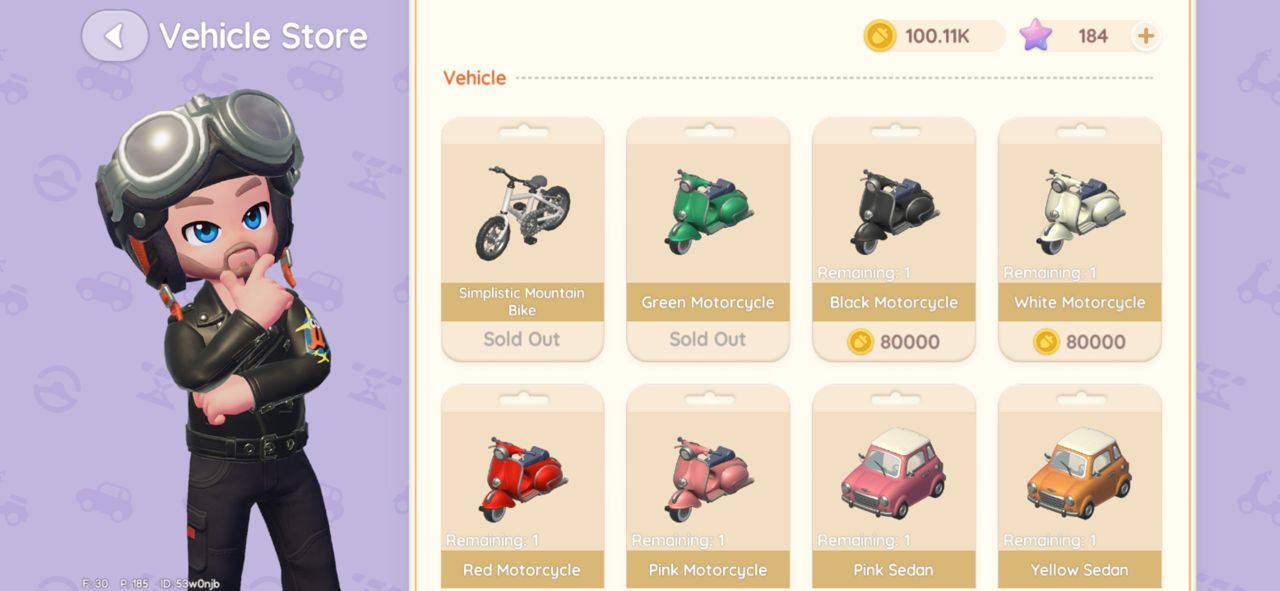
As a Heartopia enthusiast, I’ve put together a complete guide to all the vehicles you can get in the game right now! It lists every vehicle, how much they cost, and exactly how to get your hands on them.
| Vehicle Name | Price / How to Get |
|---|---|
| Simplistic Mountain Bike | 48 Wishing Stars (Vehicle Shop) |
| Green Motorcycle | Free (Story progression from Andrew) |
| Black Motorcycle | 80,000 Gold (Vehicle Shop) |
| White Motorcycle | 80,000 Gold (Vehicle Shop) |
| Red Motorcycle | 80,000 Gold (Vehicle Shop) |
| Pink Motorcycle | 80,000 Gold (Vehicle Shop) |
| Pink Sedan | 300 Wishing Stars (Vehicle Shop) |
| Yellow Sedan | 300 Wishing Stars (Vehicle Shop) |
| Blue Sedan | 300 Wishing Stars (Vehicle Shop) |
| Black Sedan | 300 Wishing Stars (Vehicle Shop) |
| White Sedan | Free (7-day login reward) |
| White Convertible | 750 Wishing Stars (Vehicle Shop) |
| Moonwards Gaze | 180 Heart Diamonds (Acorn Store) |
| Hot Chase | 1,680 Heart Diamonds (Acorn Store) |
| Matcha Chocolate | 2,800 Heart Diamonds (Acorn Store) |
| Neon Night | 2,800 Heart Diamonds (Acorn Store) |
| Elaina’s Glasses | 2,800 Heart Diamonds (Acorn Store) |
| Aurelia | 3,800 Heart Diamonds (Acorn Store) |
| Rainbow Motorcycle | Free with any real-money purchase |
| Starsea Motorcycle | Free after reaching 100,000 purchase points |
Final Thoughts
In Heartopia, vehicles aren’t just about getting around – they make travel faster and more enjoyable, and let you express yourself! From zipping around on a scooter to road-tripping with friends in a car or showing off a luxury vehicle, they add a fun and personal touch to everything you do.
Stay up-to-date with the latest mobile gaming news! Join us on WhatsApp, Telegram, or Discord. You can also find quick updates by following us on Instagram, Twitter, and Google News.
2026-02-03 14:43