
For many, the phrase “It’s in the Game” instantly brings back fond memories of playing EA Sports games. The latest version of their popular soccer simulation, FC Mobile, has just been released and is already a hit with fans. Since the game launched, there’s been a significant increase in players contacting FC Mobile 24 customer support to report bugs they’ve found.
We’re committed to making sure everyone enjoys our game without frustrating issues. Here’s how to get in touch with our support team if you run into any problems.
How to Contact FC Mobile Customer Support
You can find answers to many common questions on the official EA Sports website. If you still need help, the FC Mobile customer service team is available around the clock to assist you.
There are three ways to get in touch with FC Mobile customer support. You can use the options within the game, visit the official website, or contact EA Sports on social media.
How to Contact via in-game Customer Service Option
Launch the game on your device. Once the in-game home screen has loaded, adhere to the steps below.
- Tap on the Settings (cogwheel) icon located at the top-right corner of the home screen. The in-game Settings menu would pop up on your screen.
- You will find the Customer Service option under the settings menu but before getting in touch with the support team, you need to keep your user ID ready. You can access your user ID at the top of the Settings menu, under the Account Management section.

- Next, tap on the arrow adjacent to the Customer Service option.
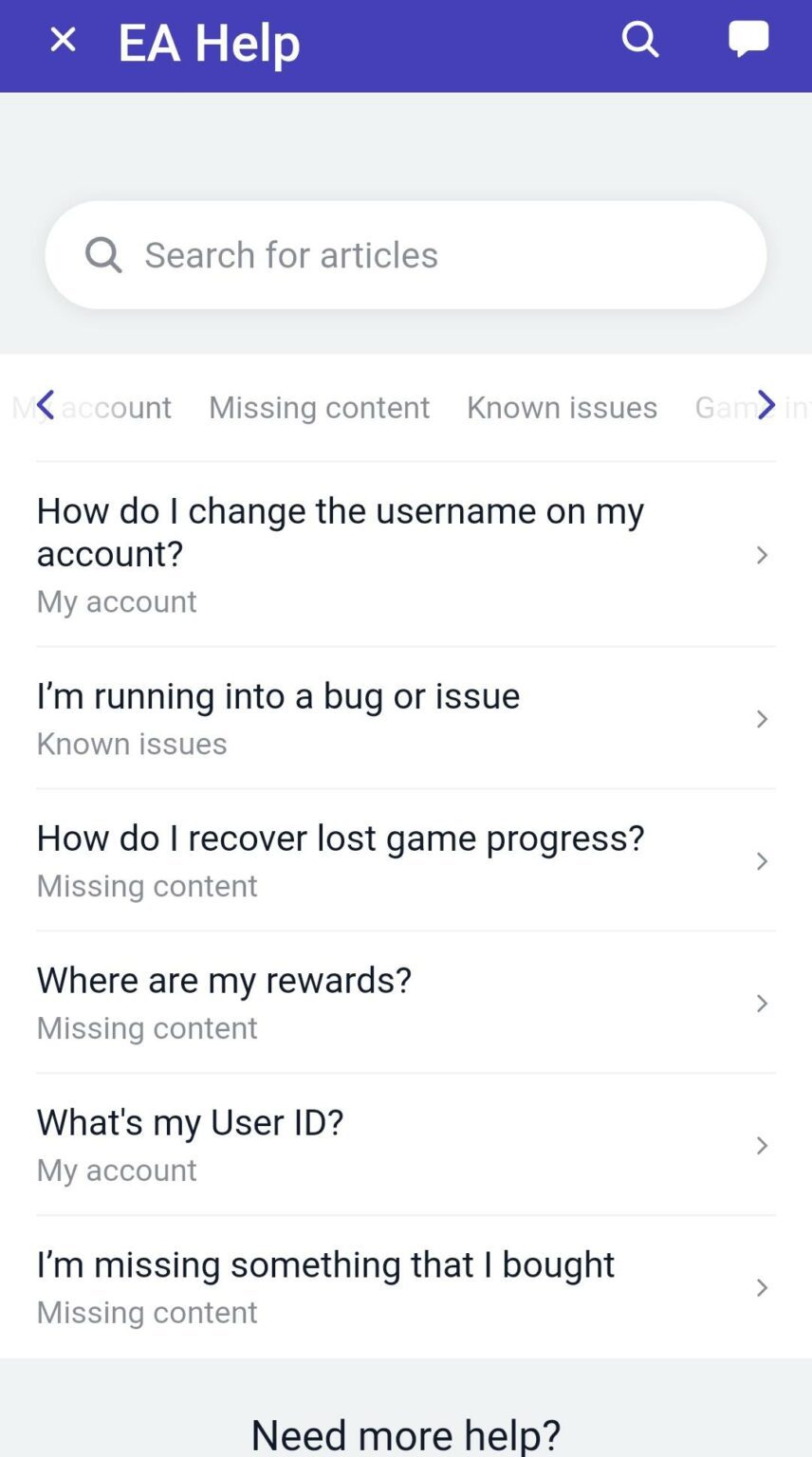
- Once you do so, you are re-directed to the EA help website. You will find out that the Developers have already addressed a lot of frequently asked queries about Your Account, Missing Content, Known Issues, Game Information, Reports, bans, suspensions, and Technical Issues. To see if your issue has been addressed out there, simply navigate to the category that best describes your issue.
- The queries addressed under that category will be visible on your screen next. To read the answers to any one of those, simply tap on that. You may even input keywords from your query to filter out the unwanted results.
Taking assistance from the Live Chat Support
If you’re still having trouble and your problem isn’t covered here, please contact our Live Chat Support for help. Here’s how to reach them:
- Scroll down to the bottom of the webpage and tap on the Chat with Us button.
- This would take you to a private chatroom where you will be asked to pick the category of your issue first, amidst a host of categories.
- Up next, you will be asked to choose a sub-category. Tap on the one that best describes your issue.
- Based on your inputs, the chatbot will revert to the FAQs that are closely linked to your issue. These options would also come with two navigable buttons. If you have already glanced through the FAQs or you could not locate/resolve your issue from the FAQs that the chatbot reverted with, tap on the No, it didn’t help me button.
- At this stage, the chatbot would look to create a support ticket for you. You will be asked for the following inputs:
- Your Email Address
- Your First Name and Last Name
- The category of your issue
- The various sub-categories that would follow.

- If the chatbot feels that there is nothing that can be done about your issue, it will close the conversation then and there. Otherwise, an agent from the EA Advisor team will get back to you as soon as he/she is available.
How to Contact by visiting the FC Mobile official website
If you’re having trouble logging in and can’t reach in-game support, you can visit the FC Mobile Answer HQ website for help.
- Go to your browser and visit the EA Sport’s Answer HQ website. Once the website loads, select FC Mobile from the list of products present under the Featured Boards section.
- Under the Answers HQ page of FC Mobile, you can access all the community discussions related to bugs, and other issues. You can also choose to put out your issue in words for the community to address that. However, you are required to log in with your EA credentials first.

- Players may additionally resort to accessing the topics that have been pre-addressed by the EA Help team here.
- Once you tap on a given topic to read the contents of it, you will discover that for some of the issues, there is a Chat With Us option available below. You can even access that and get your issues fixed. The steps for doing the same have already been discussed in the previous section.
How to Contact the Developer Team directly
If you’re still having trouble, you can contact the developers directly. You can email them at media@fifa.org or reach out on social media. For Twitter support, use @EAHelp. You can also connect with the team on the official FC Mobile Facebook page or get help from other players on their Discord server.
Stay up-to-date with the latest mobile gaming news! Join our community on WhatsApp, Telegram, or Discord. You can also find quick updates by following us on Instagram, Twitter, and Google News.
2026-01-21 16:12