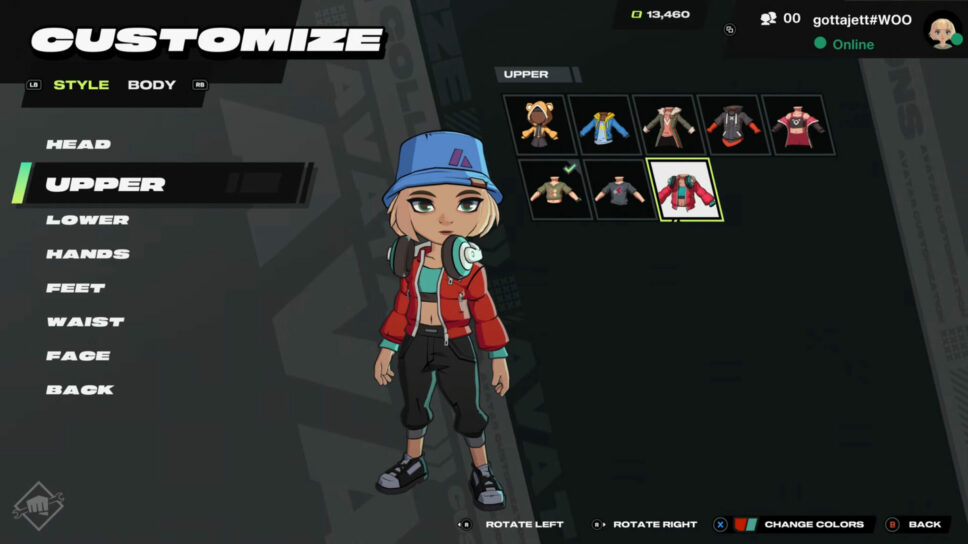
Here’s how to edit your appearance in 2XKO lobbies!
2XKO lets you create a unique in-game avatar to represent you in the game’s lobbies and express your style. Here’s a quick guide to help you customize it!
How to customize your 2XKO avatar
You can change your character’s appearance in 2XKO lobbies by going to the “Collections” tab. There, you can customize your head, body, and clothing – including your upper body, lower body, hands, waist, back, and feet.
You can also change the colors of your clothes and skin. Instead of sticking with the standard hairstyle and color, explore different options and find a look you love before saving your character. Feel free to recreate your real-life style or design something totally new and eye-catching for the game.
You can earn new ways to customize your character by playing through the 2XKO Battle Pass. Season 1 of the 2XKO Battle Pass offers both free and paid options. The free track lets you unlock one outfit, and the paid version gives you two extra items to collect.
2XKO emotes and stickers
You can also show your personality in 2XKO lobbies with emotes and stickers. Emotes are little animations, like a cheer or a thumbs-up. Stickers appear as icons above your player’s avatar.
How to unlock 2XKO skins
When customizing your 2XKO experience, you can show off cool champion skins like Arcade Vi, Heartseeker Jinx, Frame Perfect Ekko, Bees Teemo, Bladesong Yasuo, Dynasty Ahri, and many others as you compete against other players.
During the Alpha Lab playtest, players could unlock Bladesong Yasuo and Dynasty Ahri through the Battle Pass. Additionally, the Arcade, Frame Perfect, Heartseeker, and Bees skins are being offered as in-game bundles. You can see all of these bundles in the gallery below.
Read More
- Clash Royale Best Boss Bandit Champion decks
- Vampire’s Fall 2 redeem codes and how to use them (June 2025)
- Best Arena 9 Decks in Clast Royale
- Country star who vanished from the spotlight 25 years ago resurfaces with viral Jessie James Decker duet
- World Eternal Online promo codes and how to use them (September 2025)
- JJK’s Worst Character Already Created 2026’s Most Viral Anime Moment, & McDonald’s Is Cashing In
- ‘SNL’ host Finn Wolfhard has a ‘Stranger Things’ reunion and spoofs ‘Heated Rivalry’
- M7 Pass Event Guide: All you need to know
- Solo Leveling Season 3 release date and details: “It may continue or it may not. Personally, I really hope that it does.”
- Kingdoms of Desire turns the Three Kingdoms era into an idle RPG power fantasy, now globally available
2026-01-20 23:40