
Story Highlights
- Learn how to properly live-stream in MLBB and kick off your content creator journey!
- You also earn various items from fans that can converted to Diamonds later on.
Many Mobile Legends: Bang Bang players dream of becoming popular streamers and sharing their skills online. If you want to quickly gain fame within the MLBB community by streaming your gameplay, you’re in luck! The game has a built-in feature that makes it easy for almost anyone to stream their matches. This guide will show you how to live stream in MLBB.
How to start live stream in Mobile Legends: Bang Bang
- First of all, open the game on your mobile devices.
- Next, tap on the Camera like icon next to Mail in the top right corner.
- This is the LIVE section, where you can watch other streamers, or stream yourself.
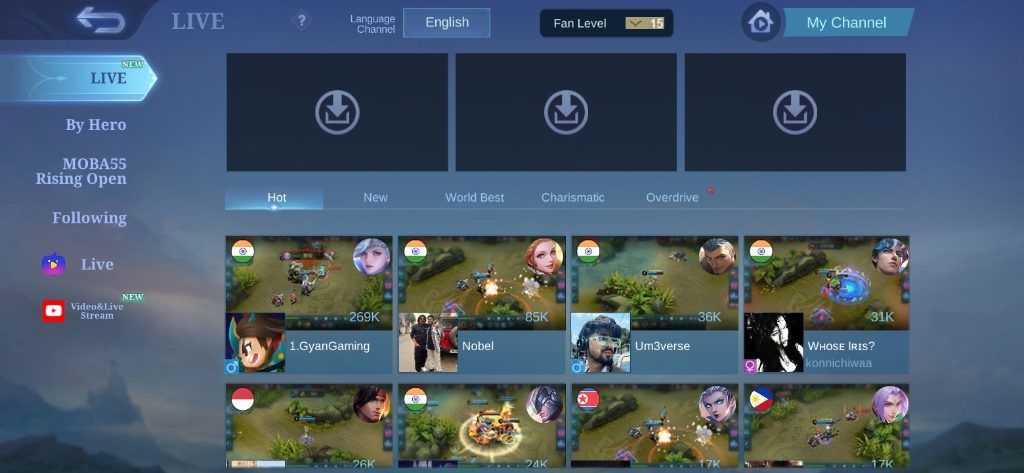
- To stream yourself, tap on My Channel at the top right corner.
- When you’re ready to start live-streaming, tap on – On in the Live Stream part. Your live stream will begin upon entering a match.

- Enter a match and start playing accordingly.
- Congratulations! You have officially begun your streaming journey here in Mobile Legends!
How to stop the live stream in Mobile Legends
- After the completion of your match, you may wish to stop your live stream in the game.
- To do so, access the LIVE section again.
- Now, tap on the My Channel button at the top right-hand corner of the screen.
- Then select Live Stream – Off.
- A notification will appear asking if you want to stop the live stream. Tap Okay to stop your live stream accordingly.
Benefits of live streaming in Mobile Legends
- Being gifted with items, like Flower, Jewelry, Airplane, and more by viewers while streaming.
- Viewers of live streams are able to give their favorite streamers various items, which can be purchased using in-game diamonds. The items will be converted to BB Coins and sent to the streamer, who in return can exchange them for in-game diamonds.
- You also gain recognition from the Mobile Legends community
- By starting off in the in-game live stream, you can eventually find yourself making your way into content creation on other platforms (YouTube, TikTok etc.) before joining the Mobile Legends Creator Camp to receive many perks and benefits!
Stay up-to-date with the latest mobile gaming news! Join our community on WhatsApp, Telegram, or Discord. You can also find quick updates by following us on Instagram, Twitter, and Google News.
Read More
- Clash Royale Best Boss Bandit Champion decks
- Vampire’s Fall 2 redeem codes and how to use them (June 2025)
- Mobile Legends January 2026 Leaks: Upcoming new skins, heroes, events and more
- M7 Pass Event Guide: All you need to know
- Clash Royale Furnace Evolution best decks guide
- Clash Royale Season 79 “Fire and Ice” January 2026 Update and Balance Changes
- World Eternal Online promo codes and how to use them (September 2025)
- Clash of Clans January 2026: List of Weekly Events, Challenges, and Rewards
- Best Arena 9 Decks in Clast Royale
- Best Hero Card Decks in Clash Royale
2026-01-05 10:45